Key Takeaways
- Set-and-Forget Tracking: Artificial intelligence (AI) budget tools connect directly to your bank cards to log your buys without you needing to write anything down.
- Smart Spending Warnings: These modern tools learn your daily routines and send text alerts before you spend too much cash on things you do not need.
- Automatic Goal Planning: The software looks at your monthly income and splits your money into bills, savings, and fun spending all by itself.
- Safe and Secure: These programs use high-level safety walls just like real banks to keep your personal data and account numbers hidden from strangers.
- Future Money Sight: By looking at your old habits, the smart tool can guess your future bills so you never get caught by surprise.
Welcome to the Future of Managing Your Money
Think about the last time you opened your wallet and wondered where all your dollar bills went. You know you had money on Monday, but by Friday, it seems to have vanished into thin air. In the past, tracking your cash meant keeping a shoe box full of paper receipts or typing numbers into a giant computer spreadsheet for hours every weekend. Most people start doing that with great hopes, but then they get tired, bored, or simply forget. Soon, the tracking stops, and the overspending starts all over again.
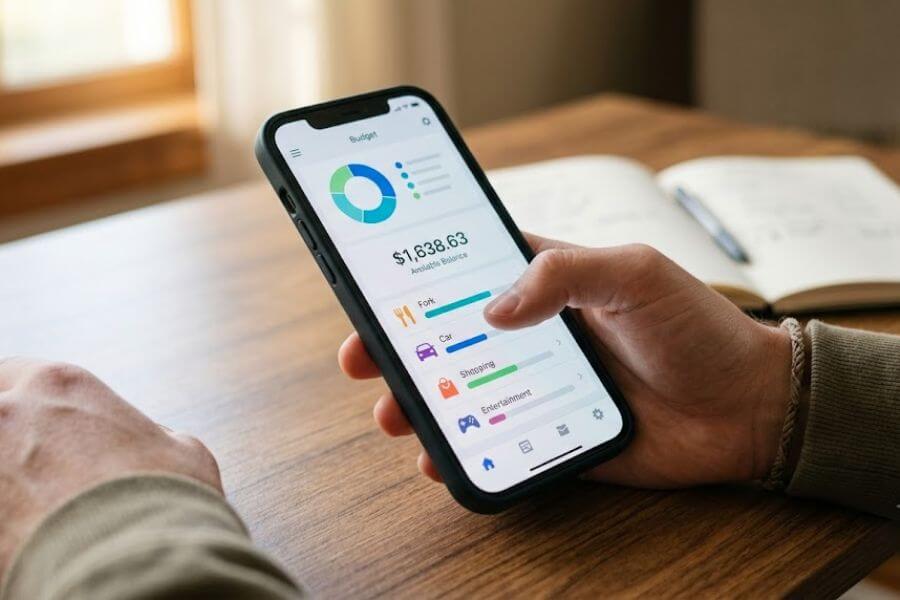
Now, you have a smart helper living right inside your smartphone. Artificial intelligence, which people call AI for short, is changing how we handle our coins and dollar bills. You do not need to be a math genius or a grown-up with a giant salary to use these tools. Smart budgeting programs do the heavy lifting for you by watching your money move around in real time. They behave like a money guide that stays in your pocket twenty-four hours a day, seven days a week.
Let us dive right into how these new digital tools work, how they can stop you from blowing your cash on things you do not need, and how you can set one up today to change your financial life forever.
What Exactly Is an AI Budgeting App?
To understand these tools, it helps to think about how regular phone apps work. A standard money app requires you to open it up and type in “Five dollars for burgers” every single time you buy lunch. If you forget to type it in, the app becomes useless.
An AI budget tool is completely different because it thinks for itself. It uses smart computer brains to look at patterns in your data. When you connect the tool to your bank account, it reads your past choices and learns who you are. It knows that when you spend money at a gas station, you are filling up your car. It knows that a charge from a grocery store means you are buying food for the week.
The Power of Machine Learning
The secret sauce inside these applications is a concept called machine learning. This simply means the computer program gets smarter the more you use it. On your first day, it might look at a strange charge and ask you what it is. But by month two, it remembers your choices perfectly. It separates your necessary bills from your fun hobbies without any help from you.
Why Brainy Apps Beat Paper Lists
Paper lists get lost under the bed or stained with coffee. Smart tools live in the cloud, which means they are always backed up and safe. They do not just wait for you to look at them; they talk to you. If you are spending cash faster than usual this month, the tool notices the speed change and warns you before your account hits zero.
How Automatic Expense Tracking Saves Your Time
The biggest reason people fail at budgeting is that tracking takes too much effort. When you have to write down every single pack of gum or soda you purchase, you quickly get tired of the chore. Smart money apps fix this issue by removing the human effort completely.
The Magic of Direct Account Linking
When you open a smart budget tool, you link your debit or credit cards to the system. Every time you swipe your card at a store or pay for something online, the bank talks to the app instantly. Within seconds, the purchase shows up on your screen. You can watch your balance update while you are still walking out of the store lobby.
Sorting Choices Without Human Help
The app does not just list the numbers in a long, boring row. It puts them into colored buckets. It creates a bucket for food, a bucket for clothes, a bucket for video games, and a bucket for train rides.
Here is a quick view of how a smart app handles your daily transactions versus the old way of doing things.
| Action Type | The Old Way of Budgeting | The Smart AI App Way |
| Logging a purchase | Save the paper receipt, sit down at a desk, type it in manually | Swipe your card and the app logs the purchase in three seconds |
| Picking a category | Guess where it fits or create a manual folder every time | Computer brain reads the store name and sorts it automatically |
| Updating your balance | Do the subtraction math yourself or wait for the bank statement | Screen updates instantly so you always see your true net worth |
| Finding hidden errors | Read through pages of bank statements at the end of the month | App flags weird or double charges the exact moment they happen |
The Secret Weapon to Stop Overspending
Knowing where your money went is helpful, but stopping yourself from spending too much in the future is the real goal. This is where the artificial intelligence truly shines. It acts like a speed limit sign for your wallet.
Real-Time Alerts and Warnings
Imagine walking into your favorite clothing store. You see a jacket that looks amazing, but it costs eighty dollars. You are not sure if you have enough money left in your clothing budget for the month. A smart AI app knows your limits. It can send a gentle notification to your phone screen saying, “You have thirty dollars left for clothes this month. If you buy this, you will go over your limit.” This quick reminder gives you a moment to pause and think before you hand over your card.
Finding Hidden Monthly Subscriptions
Many times, we sign up for a free trial of a streaming video service or a gaming club and forget to cancel it. The company keeps taking ten dollars out of our account every single month. These are called ghost subscriptions, and they drain your cash without you realizing it.
Smart software looks for these repeating patterns. It will pop up with a message like, “We noticed you paid this gaming company three months in a row. Do you still use this?” This allows you to cut off those money leaks with a simple tap of your finger.
Setting Up Your Smart Budget App in Five Steps
Getting started with a smart money app is simple, and you can get everything ready to go during a short commercial break while watching television. You do not need any special gear, just your smartphone and your bank login details.
Step One: Pick Your Software Companion
Go to your device app store and look for highly rated budget tools that mention automatic tracking or smart sorting. Download the one that looks clearest to your eyes. Many of the best options are completely free to use, while some offer extra fancy features for a small monthly fee.
Step Two: Connect Your Main Accounts
Open the app and follow the steps to link your checking accounts, savings accounts, and any cards you use for shopping. The app will open a secure window where you type your bank details. This connection is read-only, which means the app can only see the numbers; it can never touch or move your money.
Step Three: Let the AI Study Your Past
Once linked, the computer brains will look back at your past thirty to ninety days of history. It will crunch the data to see how much you usually spend on rent, food, gas, and entertainment. This step takes just a couple of minutes, but it allows the app to understand your lifestyle.
Step Four: Set Your Financial Target Targets
The app will suggest a budget for you based on your past habits, but you can change the numbers to fit your goals. If you want to save five hundred dollars for a summer trip, tell the app. It will automatically lower your fun spending limits to make sure you hit that target.
Step Five: Check Your Notifications Daily
Turn on phone notifications for your budget helper. This keeps you connected to your goals. Spending two minutes looking at your phone dashboard every morning keeps your mind focused on your money without causing stress.
Understanding the Safety and Security of Your Data
It is completely normal to wonder if it is safe to connect an app to your real bank account. You work hard for your money, and you do not want anyone stealing your details or taking your coins.
Bank-Level Protection Guards
Good financial apps use the exact same safety systems that large global banks use. This protection is called high-level encryption. It scrambles your passwords and account numbers into a secret code that no human can read. If a bad guy tries to peek at the data, all they see is a jumble of random letters and symbols that make no sense.
Read-Only Status Means Zero Risk
The most vital thing to know is that these applications use a read-only bridge. Think of it like a glass window. The app can look through the glass to see your balance and read your history, but it cannot reach through the glass to touch the money. It cannot pay a bill for you, it cannot transfer money to another person, and it cannot buy things on its own. Your money stays locked safely inside your real bank.
How Smart Apps Build Long-Term Wealth
Budgeting is not just about avoiding trouble today; it is about building a beautiful life for your future self. When you stop wasting money on small things that do not matter, you unlock the power to buy big things that do matter.
Growing Your Savings Stash Painlessly
Many smart budget tools have an option to save money without you even noticing. They do this through a method called rounding up. If you buy a sandwich for four dollars and fifty cents, the app rounds the purchase up to five dollars. It takes that extra fifty cents and slides it into a separate savings bucket. Over a year, those tiny coins add up to hundreds of dollars of extra savings.
Planning for the Unexpected Emergency
Life is full of sudden turns. Your phone screen might crack, your bicycle might get a flat tire, or you might need a sudden trip to the doctor. If you do not have savings, these events can ruin your mood and crash your finances. A smart app helps you build an emergency fund by nudging you to save a small portion of every paycheck before you get the chance to spend it.
Comparing Different Smart Budget Methods
Not every person thinks about money the same way. Some people like to control every single penny, while others want a hands-off experience. Smart tools can adjust their settings to match whatever style makes you feel most comfortable.
The Fifty-Thirty-Twenty Rule
This is a famous money plan that splits your income into three clean sections. The smart app can monitor this ratio for you automatically.
- Fifty Percent for Needs: This covers things you must pay for to survive, like your home rent, basic groceries, and electricity bills.
- Thirty Percent for Wants: This is your fun money for going to the movies, buying video games, or eating out at cool restaurants.
- Twenty Percent for Savings: This money goes straight into your savings account or pays off old debts to build your future security.
The Envelope Method Turned Digital
In the old days, people put paper cash into physical envelopes marked “Food” or “Clothes.” When an envelope was empty, you could not spend any more money on that item. Smart apps do this digitally. They create virtual envelopes on your screen. If your digital food envelope hits zero, the app alerts you that the kitchen pantry is your only option for dinner.
Common Mistakes to Avoid with Money Software
While these smart applications are amazing helpers, you still need to be the boss of your own wallet. Relying too much on technology without paying attention can lead to mistakes.
Ignoring the App for Weeks
An app cannot help you if you never open it. If you slide the application into a deep folder on your phone and turn off all alerts, you will go back to your old ways of overspending. Make the app easy to find on your home screen right next to your favorite social media tools.
Forgetting About Cash Buys
If you use paper cash to buy a soda at a local market, your connected app has no way of knowing about it because cash does not leave a digital trail. You must remember to open the app and type in those rare cash transactions yourself so your total budget stays accurate.
Frequently Asked Questions
Can I use a smart budget app if I do not have a steady job or regular monthly income?
Yes, you can absolutely use these tools. In fact, smart apps are highly useful for people with changing income, like freelancers or students with part-time gigs. The computer brain will look at your average earnings over time and help you build a safe spending limit based on what you realistically have in your account.
Do these modern financial tools work with small local banks or credit unions?
Almost all popular smart money programs connect to thousands of different financial hubs, including small town credit unions and regional banks. When you search for your bank during the setup process, you will likely find it on the list. If your bank is missing, most apps allow you to upload your files manually.
Will using an automatic money app hurt my credit score or alert credit companies?
No, using a budget app has zero effect on your credit score. These tools simply read your data to help you organize your life. They do not share your private habits with credit bureaus or reporting agencies. They are private tools designed solely for your personal benefit.
What should I do if the software places a purchase into the wrong bucket?
It is very easy to fix a wrong category. If the app thinks a book you bought for school is an entertainment expense, you can tap on the transaction and change the tag to education. The smart computer brain will remember your correction and will sort similar purchases correctly the next time you shop at that store.
Is it possible to share a smart budget application account with a partner or parent?
Yes, many top financial programs offer joint accounts or sharing options. This allows two people to link their individual cards to the exact same central budget dashboard. It is a fantastic way for couples, roommates, or parents and teenagers to track shared household costs and reach big financial milestones together.